

Новое поступление

1/10/20 шт розетка настенная AC мощность тестер датчика детектора напряжения

Цифровой Бесконтактный AC Электрический Тестер Напряжения Ручка детектор цепи

1 шт. электрический индикатор 90-1000 В розетка настенная переменного тока тестер

Измеритель напряжения вольтметр-амперметр 3-значный с двойным жк-дисплеем 110
106,52 - 159,79 руб.

HC-72 0-10V указатель типа вольтметр измеритель напряжения | Инструменты
225,22 руб.

PZEM-004T AC Voltmeter Ammeter PC Display Power Meter Watt Active Volt Amp TTL Current Energy Test Module For Arduino | Инструменты
664,33 - 727,28 руб.

Двухрядный USB тестер зарядного устройства показывает ток напряжения зарядный
287,42 - 343,54 руб.

EYEWINK 001 Store
Магазина EYEWINK 001 Store работает с 05.08.2019. его рейтинг составлет 93.38 баллов из 100. В избранное добавили 1151 покупателя. Средний рейтинг торваров продавца 4.7 в продаже представленно 431 наименований товаров, успешно доставлено 17592 заказов. 5797 покупателей оставили отзывы о продавце.
Характеристики
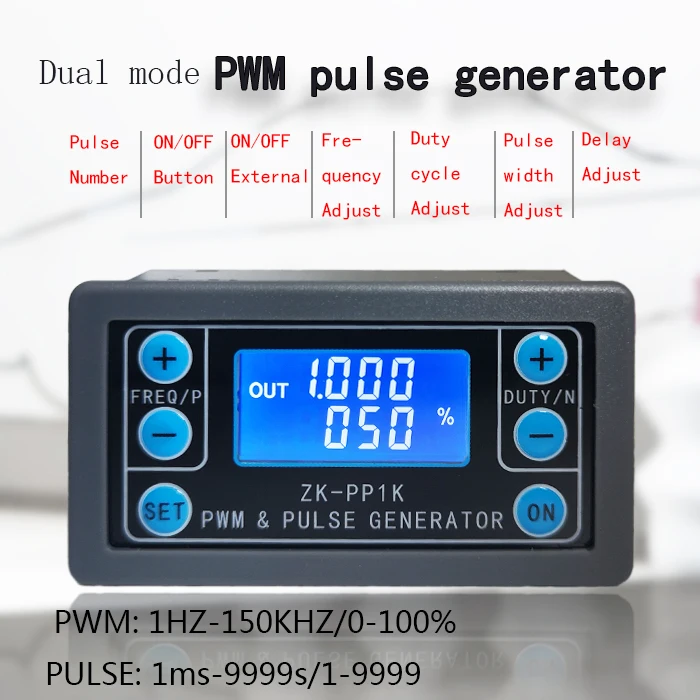
ZK-PP1K PWM pulse frequency duty cycle adjustable module square wave rectangular signal function generator | Инструменты
История изменения цены
*Текущая стоимость 269,22 уже могла изменится. Что бы узнать актуальную цену и проверить наличие товара, нажмите "Добавить в корзину"
| Месяц | Минимальная цена | Макс. стоимость | Цена |
|---|---|---|---|
| Feb-19-2026 | 342.10 руб. | 349.30 руб. | 345.5 руб. |
| Jan-19-2026 | 277.21 руб. | 283.65 руб. | 280 руб. |
| Dec-19-2025 | 336.96 руб. | 343.47 руб. | 339.5 руб. |
| Nov-19-2025 | 334.2 руб. | 341.69 руб. | 337.5 руб. |
| Oct-19-2025 | 266.50 руб. | 271.74 руб. | 268.5 руб. |
| Sep-19-2025 | 328.55 руб. | 335.21 руб. | 331.5 руб. |
| Aug-19-2025 | 325.33 руб. | 332.49 руб. | 328.5 руб. |
| Jul-19-2025 | 323.42 руб. | 329.93 руб. | 326 руб. |
Описание товара

1.PWM signal generator, square wave rectangular wave signal generator
2. Used to generate a square wave rectangular wave signal, which is supplied to a DC motor or a stepper motor driver; Stepper motor, servo motor, electric gripper, robot arm
3. Combine the driver to realize dimming, speed regulation, control solenoid valve, etc. However, it is not possible to directly drive loads such as electric lights, motors, and solenoid valves
1. Highlights:
1.1 Two modes can be selected:
PWM mode - frequency (continuous), duty cycle.Note that the number of pulses cannot be set in this mode, and the pulse is always emitted;
PULSE mode - positive pulse width time, negative pulse width time, delayed start time, and adjustable number of pulses.
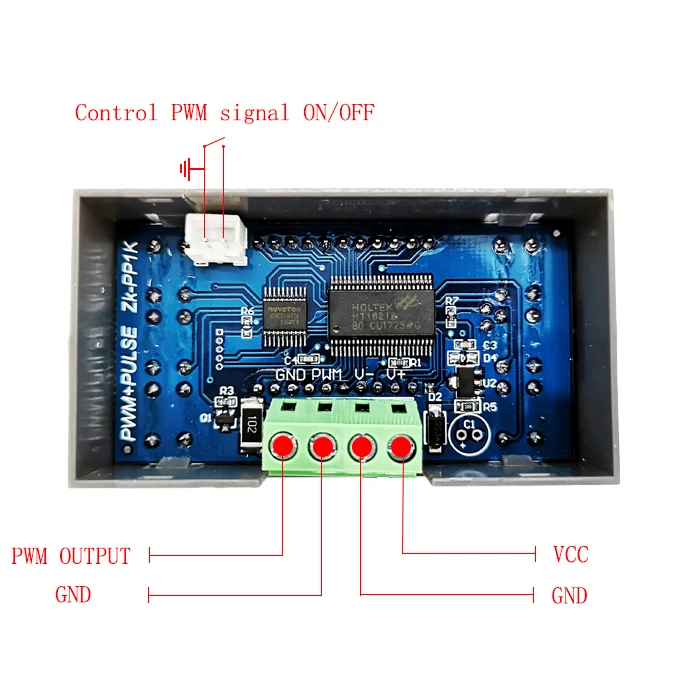
1.2 With start-stop button, external switch can also be used to control output signal ON/OFF.
1.3 Wide voltage input 3.3-30V, with anti-reverse protection, 5.08mm terminal wiring
2. Technical parameters:
2.1 Working voltage: 3.3~30V, with anti-reverse protection
2.2 Frequency range: 1Hz~150KHz, accuracy about 1%
2.3 duty cycle range: 0-100%, 1% stepping
2.4 number of pulses: 1-9999, or infinite (display '----' stands for infinity)
2.5 delay output time: 0.000s-9999s, the minimum can be set 1ms
2.6 positive and negative pulse width length: 0.000s-9999s, the minimum can be set 1ms
2.7 signal loading capacity: less than 30mA
2.8 Output signal amplitude: amplitude is equal to the supply voltage
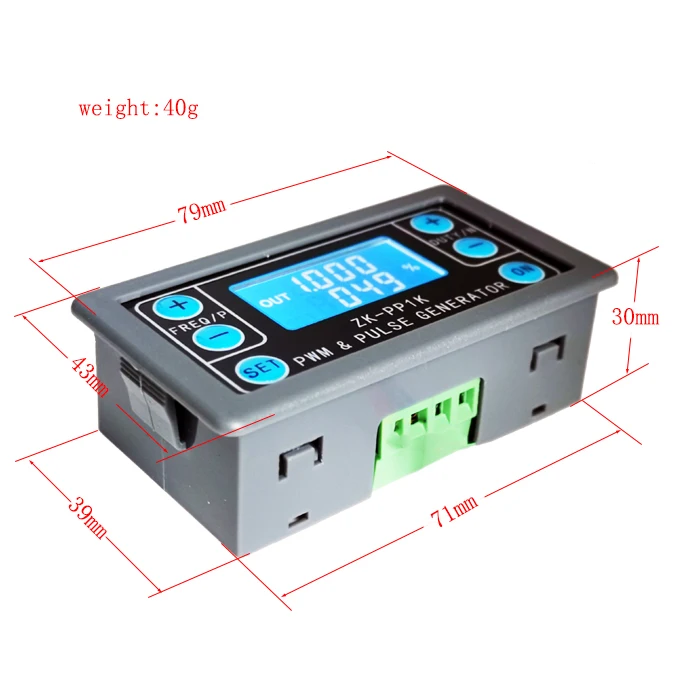
2.9 Product size: 79mm*43mm*30mm
2.10 Product Weight: 40g
2.11 Packing: Anti-static bag
3. Module description:
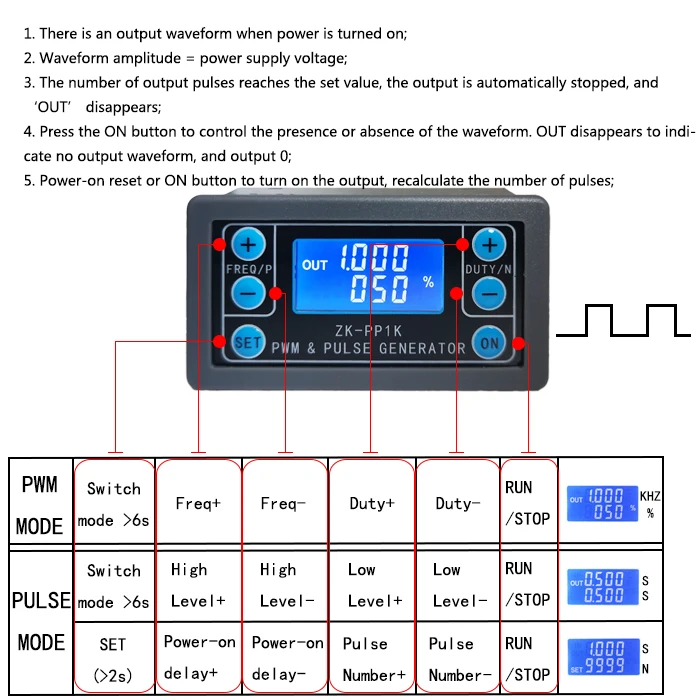
3.1 button operation instructions
3.2 PWM mode (display has "%" for PWM mode)
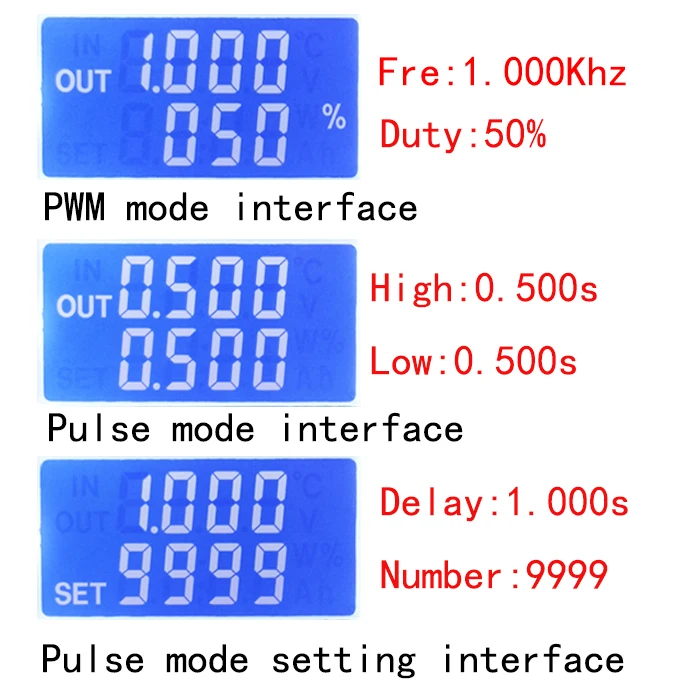
The factory default mode is PWM mode, FREQ+ and FREQ-key set frequency, DUTY+ and DUTY-button set duty cycle; short press ON button control signal output or stop, stop output is 0, the screen displays "OUT" mark as There is output, otherwise it stops output; the default factory frequency is 1KHZ and the duty cycle is 50%.
If you want to switch to PULSE mode, long press the SET button (more than 6 seconds), do not release, you will see the screen change, "%" disappears, it is PULSE mode.
3.3 PULSE mode (No "%" on the right side of the display is PULSE mode)
The line above the LCD screen displays the positive pulse width time. The P+ and P- buttons set the parameter. The line below the LCD screen displays the negative pulse width time. The N+ and N- buttons set the parameter. Press the ON button to control the signal output or stop. When the output is stopped, the output is 0. The screen displays "OUT" for output, otherwise it stops output; the default factory positive pulse width is 0.5 seconds and the negative pulse width is 0.5 seconds.
Pulse number and delay time setting - In PULSE mode, press and hold the SET button for 2 seconds and then release, enter the pulse number and delay time setting interface, the screen displays SET, it will be turned off and cleared after entering. ;P+ and P- buttons set the delay time, N+ and N- buttons set the number of pulses, the factory default delay time is 0 seconds, the number of pulses is infinite (display ----); then press SET button 2 In seconds, it will automatically return to the pulse interface, press the ON button, after the delay setting time, start to issue the set number of pulses. If the number of pulses is sent, it will automatically output 0. If the period is not sent, pressing the ON button will turn off. The output pulse is turned off and cleared, and the set number of pulses is issued each time it is started. After the number of pulses is sent, the display 'OUT' automatically disappears.
3.4 Application Operation Examples
3.4.1 PWM output 20KHZ, 60% duty cycle: Select PWM mode, the frequency is set to 20.00, and the duty ratio is set to 060%.
3.4.2 The output is turned on for 0.6 seconds and turned off for 0.2 seconds. Infinite loop: select PULSE mode, the positive pulse width is set to 0.600, the negative pulse width is set to 0.200, the delay time is set to 0.000, and the number of pulses is set to --- -.
3.4.3 Power on or press the start button, delay 5 seconds, then the output is turned on for 0.6 seconds, off 0.2 seconds, infinite loop: select PULSE mode, positive pulse width is set to 0.600, negative pulse width is set to 0.200, delay The time is set to 5.000 and the number of pulses is set to ----.
3.4.4 Power on or press the start button, delay 5 seconds, then output high level 10ms low level 10ms pulse 100: select PULSE mode, positive pulse width is set to 0.010, negative pulse width is set to 0.010, delay The time is set to 5.000 and the number of pulses is set to 0100.
3.4.5 Power-on delay for 10 seconds, then permanently output signal: select PULSE mode, the positive pulse width is set to a number greater than 0, the negative pulse width is set to 0, the delay time is set to 10.00 seconds, and the pulse number is infinite. (----).
3.4.6 Other applications can explore or consult customer service
All setup parameters are not lost when they are turned off.


Смотрите так же другие товары: